https://www.facebook.com/adsmanager/audiences

terça-feira, 2 de agosto de 2022

quarta-feira, 6 de julho de 2022
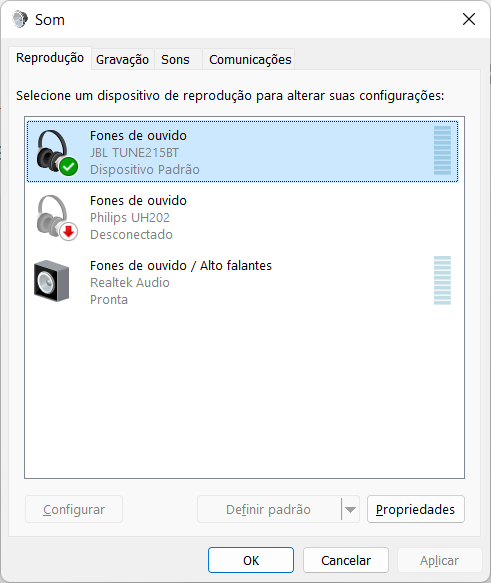
How to enable Bass of my JBL Tune 215BT on Windows 11
Windows 11:
- Start
- Sound (settings)
- More sound settings
- Choose Enhancements

On Windows 10:
- Start
- Change System Sound (on Windows 10)
- Choose Enhancements
sexta-feira, 11 de março de 2022
Update Ubuntu
do-release-upgrade
Checking for a new Ubuntu release
Please install all available updates for your release before upgrading.
sudo apt upgrade
do-release-upgrade
segunda-feira, 3 de janeiro de 2022
PHP .htaccess
Azure App Service on Linux images using PHP 8.x are now bundled with NGINX instead of Apache. The use of .htaccess files will not work for NGINX as these are used for Apache only. This will require the need to setup a custom startup script and modifying the existing NGINX site configuration.
NGINX Rewrite Rules for Azure App Service Linux PHP 8.x - (azureossd.github.io)
sábado, 9 de outubro de 2021
How to install Windows 11 on unsupported CPU
It is unsupported.
How I did it:
I added this to the Windows Registry:
On
HKEY_LOCAL_MACHINE\SYSTEM\Setup\MoSetup
added a DWORD
called
AllowUpgradesWithUnsupportedTPMOrCPU
with value of
00000001
or do this automatically Registry Key
(
On a more recent laptop it worked,
but in an older one even adding the entry
AllowUpgradesWithUnsupportedTPMOrCPU in registry was not passing...
So I deleted the \sources\appraiserres.dll file and the verification stopped preventing installation on this old laptop I have here.
)
Downloaded the Windows 11 ISO from Microsoft
Double clicked the ISO file, and ran Setup.exe
It was installed successfully!
Now on Windows 11:
To speed up my laptop, I just disabled these services: SysMain and Windows Search
How to pronounce a word in english
If you are not sure about how to pronounce a word there's a website where you can find help:
https://pt.youglish.com/
There you can search for youtube videos that contain the word you wish to find. And plus you can choose the accent. US, UK or Australian
terça-feira, 17 de agosto de 2021
How to see Differences between two Files in Visual Studio using Tools.DiffFiles
View -> Other Windows - Command Window (Ctrl + Alt + A)
Tools.DiffFiles C:\shapes\old.txt C:\shapes\new.txt

Assinar:
Postagens
(
Atom
)